
Paying monthly vs paying annually
We want to make your Toggl Track billing experience as clear and simple as possible. You have the flexibility to pay for your subscription on a monthly or annual basis.
Here’s a breakdown to help you understand the differences and choose the best option for your team.
Paying monthly
Monthly payments work similarly to other services. You are charged monthly based on your organization's number of licenses. Adding a user mid-month automatically creates a new license, billed pro-rata.
Removing a user frees them from their license, but the license itself stays vacant and billed until an admin removes it — see Understanding licenses in Toggl Track.
They are more expensive than annual but offer more flexibility as you're billed for one month at a time.
Paying annually
Removing users from the organization will leave you with a vacant license you can assign to someone else at no extra cost, for the rest of your billing cycle.
What this means: You've already paid for that license for the current billing cycle. It stays open and can be filled by a new member at no additional cost.
Example: If an employee leaves, you can invite their replacement to take the vacant license at no extra cost for the rest of the billing period.
Important: A vacant license does not automatically drop off your subscription. It stays part of your license count — and you keep paying for it — until an admin manually removes it from the Subscription page. On your renewal date, you're charged for your license count, not your active user count. If you want your renewal to reflect a smaller team, remove the vacant licenses before your renewal date. Full details in Understanding licenses in Toggl Track.
For both annual and monthly plans
- The free trial is enabled automatically for your first organization and workspace. Subsequent organizations and workspaces are on the Free plan.
- You will be charged for all licenses in your organization after the trial ends — including any vacant licenses that haven't been removed. There is no way to have 'free' licenses in a paid organization.
- The plan will renew each month or year automatically until canceled. We do send you a reminder about this a few days before the renewal.
- Charges incurred during the cycle (adding new users) will be added to the next invoice pro-rata.
- Refunds will only be issued if a system error caused the charge. See our Terms of Use for more info.
- We will downgrade the organization to Free or suspended unless we can collect a payment within seven days of creating an invoice.
- An invoice is generated every time we charge your organization. You can download this, as explained here.
- Canceling a subscription won't end it immediately. You will continue to have access to the canceled plan's features until the end of the current billing cycle (monthly or annual). Canceling prevents your organization from being charged in the future.
- Adding a member automatically creates and assigns them a license. Removing a member does not automatically remove their license — an admin has to do that separately from the Subscription page. See Understanding licenses in Toggl Track.
How does proration work at Toggl Track?
If your Organization's user count changed during the subscription cycle, you'd see additional items in your next Track invoice. They'll look something like this:
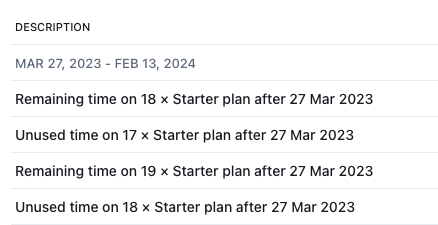
- Remaining time represents the charges/cost to finish the current subscription cycle with the new user count.
- Unused time is the credit you receive for the unused portion of the subscription. It's issued for fewer users as it doesn't include the newly added user(s).
ℹ️ To calculate the actual cost of the added user(s), deduct the unused time charges from the remaining time charges.
Adding users to an annual plan
When you add a user during an active annual billing cycle, an invoice is generated so the new license is paid for through the remainder of the current cycle. Because the seat has less than a full year left before renewal, you are not charged the full annual amount (e.g. $108/user/year at $9/month × 12) — instead you pay a smaller prorated amount covering only the time from the addition date to your next renewal date.
Updated on: 07/24/2026
Thank you!