
Creative Agency
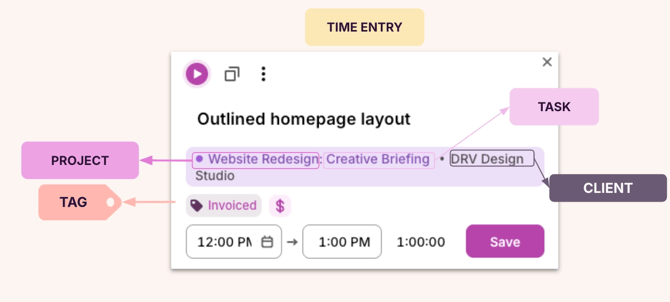
📸 Time entry example 1:
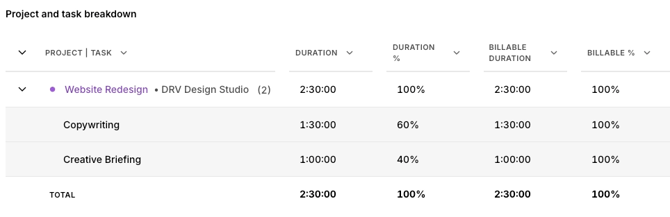
📊 How it appears in reports
📕 How to read this example
| Data object | How it’s being used | Example |
|---|---|---|
| Client | Who the work is done for | DRV Design |
| Project | The specific initiative the work belongs to | Website Redesign |
| Task | The activity or phase currently from the initiative | Creative Briefing |
| Tag | Additional context or milestones | Invoiced |
| Billable / Non-billable | Shows whether the time counts toward client billing | Billable |
| Description | Short summary of what was done | Outlining the homepage layout |
🧭 When to use this structure
This structure works best for agencies that:
- Bill clients for services and deliverables.
- Need to track work across multiple projects or campaigns.
- Want visibility into which phases consume the most time.
- Report on billable work.
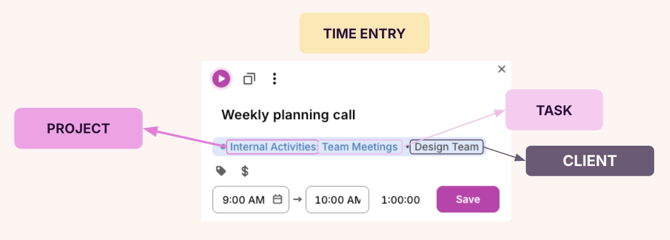
📸 Time entry example 2:
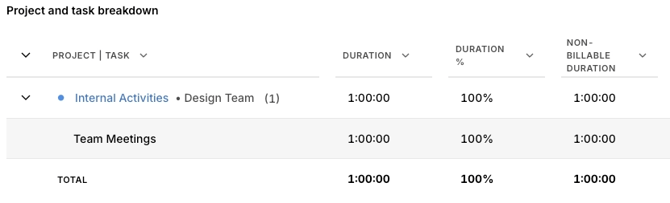
📊 How it appears in reports
📕 How to read this example
| Data object | How it’s being used | Example |
|---|---|---|
| Client | Internal team the user is a part of | Design Team |
| Project | Type of internal work being tracked | Internal Activities |
| Billable / Non-billable | Shows whether the time counts toward client billing | Non-billable |
| Description | A short summary of what was done | Weekly planning call |
🧭 When to use this structure This structure works best for agencies that:
-
- Need to separate client work from internal operations.
- Track non-billable time like team meetings, administrative tasks, and more.
- Want to understand how much time goes toward internal activities vs. client deliverables.
- Report on team capacity and availability.
Public Sector
📸 Time entry example:
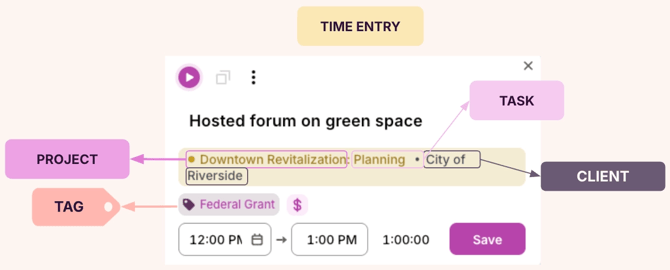
📊 How it appears in reports
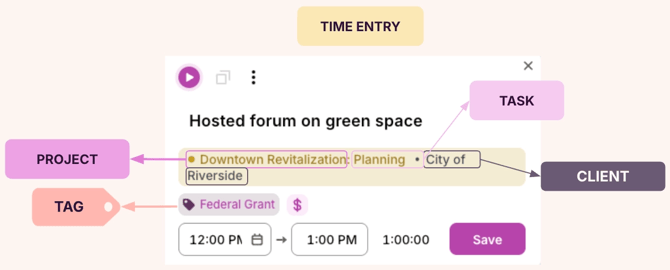
📕 How to read this example
| Data object | How it’s being used | Example |
|---|---|---|
| Client | The jurisdiction, agency, or department the work is for | City of Riverside |
| Project | The specific initiative or funded program being worked on | Downtown Revitalization |
| Task | The execution stage or phase of work | Planning |
| Tag | Funding source, scope, or priority level | Federal Grant |
| Billable / Non-billable | Shows whether the time is billable to a grant, contract, or funding source | Billable |
| Description | Short summary of what was done | Hosted forum on green space |
🧭 When to use this structure This structure works best for public sector organizations that:
-
- Manage multiple initiatives across different jurisdictions or departments.
- Need to track time against specific funding sources like federal grants, state budgets, or donations.
- Report on how resources are allocated across programs and compliance requirements.
- Separate work by priority level or funding type for audit and accountability purposes.
Consulting Firm
📸 Time entry example:
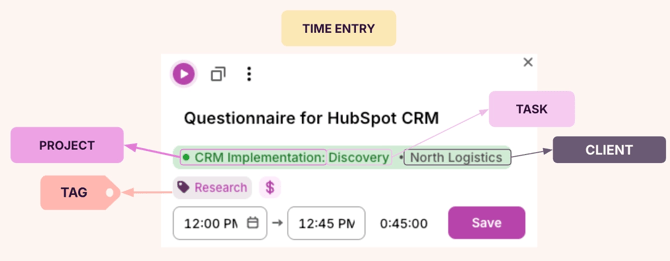
📊 How it appears in reports
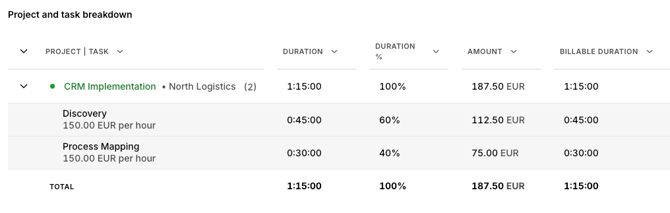
📕 How to read this example
| Data object | How it’s being used | Example |
|---|---|---|
| Client | The consulting recipient or customer | North Logistics |
| Project | The specific consulting deliverable | CRM Implementation |
| Task | The phase of the deliverable being worked on | Discovery |
| Tags | The type of work or internal category | Research |
| Billable / Non-billable | Shows whether the time counts toward client billing | Billable |
| Description | Short summary of what was done | Questionnaire for HubSpot CRM |
🧭 When to use this structure This structure works best for consulting firms that:
-
- Work with multiple clients on engagements, projects, or deliverables.
- Need to track billable hours across different clients, projects, and tasks.
- Want visibility into what types of activities consume the most time.
- Report on project progress and profitability.
- Bill clients based on the amount of hours worked.
SaaS Product & Engineering Teams
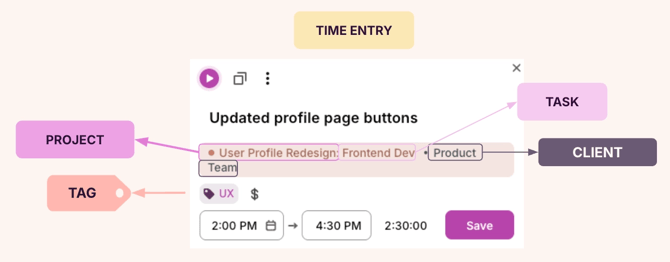
📸 Time entry example:
📊 How it appears in reports
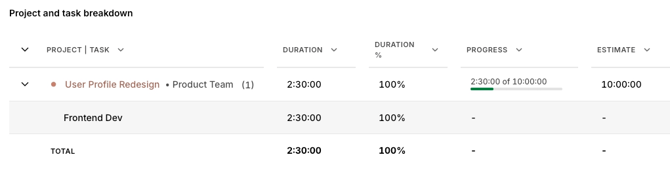
📕 How to read this example
| Data Object | How it’s being used | Example |
|---|---|---|
| Client | The internal business unit, department, or product line the work supports | Product Team |
| Project | The feature rollout, initiative, or maintenance work being tracked | User Profile Redesign |
| Task | The item or type of development work | Frontend Dev |
| Tags | The area or activity type | UX |
| Billable / Non-billable | Shows whether the time is billable to an external client | Non-billable |
| Description | Short summary of what was done | Updated profile page buttons |
🧭 When to use this structure This structure works best for SaaS and engineering teams that:
-
- Build and maintain internal products rather than client deliverables.
- Track work across multiple product lines, business units, or departments.
- Need visibility into how much time goes toward features, bugs, or maintenance.
- Report on progress, team capacity, and initiatives being worked on.
Customer-Facing Teams (Sales, CSMs, TAMs)
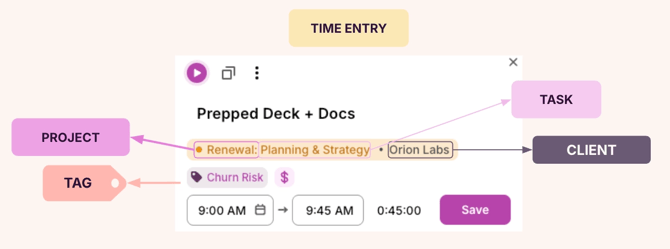
📸 Time entry example 1:
📊 How it appears in reports
📕 How to read this example
| Data object | How it’s being used | Example |
|---|---|---|
| Client | The organization receiving the work | Orion Labs |
| Project | The initiative being supported | Renewal |
| Task | The specific activity related to the initiative | Planning and Strategy |
| Tags | Additional context that helps categorize the work | Churn Risk |
| Billable / Non-billable | Shows whether the time is billable to an external client | Billable |
| Description | A short summary of what was done | Prepped Deck + Docs |
🧭 When to use this structure This structure works well for teams that:
- Manage ongoing client relationships and need to categorize work.
- Track activity across the customer lifecycle: onboarding, adoption, renewal, and more.
- Want visibility into how time is allocated across accounts, touchpoints, and other customer-facing activities like retention, expansion, or general account health.
- Bill for consultative or project-based support, and need to distinguish internal planning vs. client work.
📸 Time entry example 2:
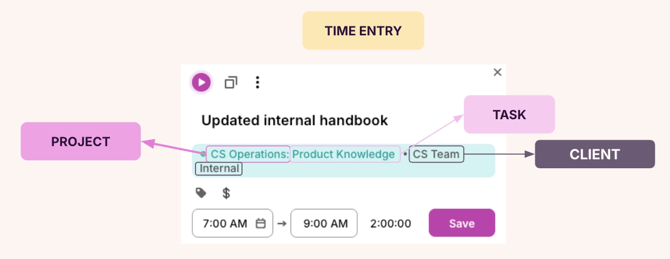
📊 How it appears in reports
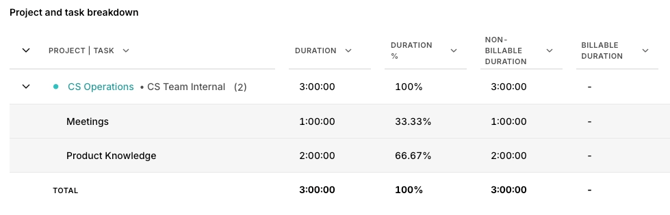
📕 How to read this example
| Data object | Purpose | Example |
|---|---|---|
| Client | The internal group the work supports | CS Team Internal |
| Project | The operational area or initiative being worked on | CS Operations |
| Task | The type of internal enablement or support work | Product Knowledge |
| Billable / Non-billable | Indicates this is internal work not charged to customers | Non-billable |
| Description | Short summary of what was done | Updated internal handbook |
🧭 When to use this structure This structure is a good fit for customer-facing teams that:
-
- Need to capture internal effort that supports customer work (enablement, documentation, process maintenance, and more).
- Require reporting between customer-facing time (billable) and internal operation time (non-billable).
- Track time spent on enablement, documentation, and process improvements that support customer-facing work.
- Want better visibility into team readiness such as training, content updates, improvements, and more.
Professional Services Teams
📸 Time entry example:
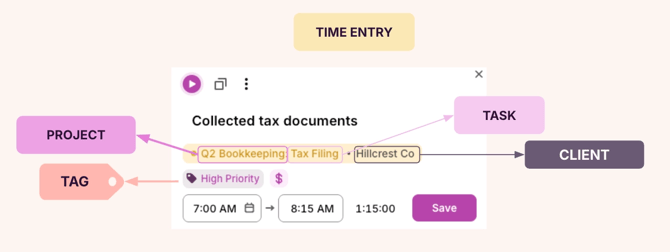
📊 How it appears in reports
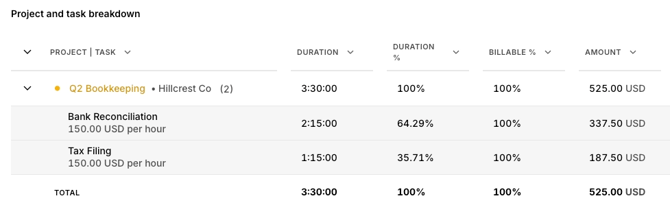
📕 How to read this example
| Data Object | How it’s being used | Example |
|---|---|---|
| Client | The external organization receiving the service | Hillcrest Co |
| Project | The accounting period or engagement being worked on | Q2 Bookkeeping |
| Task | The specific service or workflow step being performed | Tax Filing |
| Tags | An additional layer of categorization or indicator of urgency, service type, or status | High Priority |
| Billable / Non-billable | Shows if the work is billable to the client | Billable |
| Description | Short summary of what was done | Collected tax documents |
🧭 When to use this structure This structure is ideal for Professional Services teams that:
-
- Work on client-specific work with clear deliverables (bookkeeping, consulting, audits, etc).
- Need visibility into time spent per client, service line, or reporting period.
- Track both high-level projects and detailed service tasks.
- Require accurate billable hour reporting for invoicing and profitability analysis.
Legal Professionals (Law Firms)
📸 Time entry example:
📊 How it appears in reports
📕 How to read this example
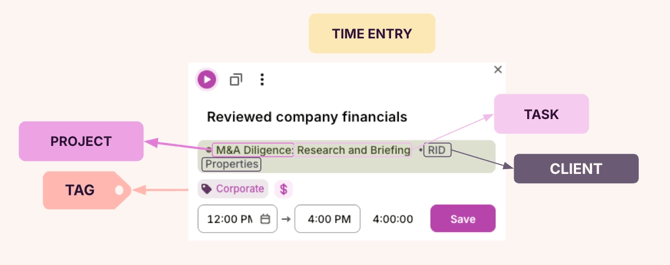
| Data Object | How it’s being used | Example |
|---|---|---|
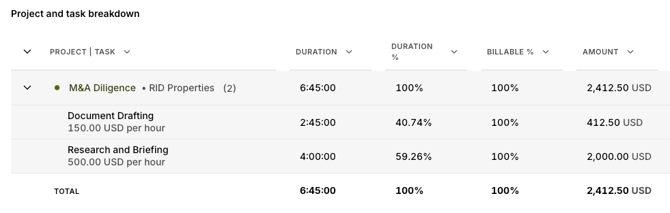
| Client | The organization receiving legal support | RID Properties |
| Project | The matter or case being worked on | M&A Diligence |
| Task | The type of legal work completed | Research and Briefing |
| Tags | The practice area the work falls under | Corporate |
| Billable / Non-billable | Shows whether the time counts toward client billing | Billable |
| Description | Short summary of what was done | Reviewed company financials |
🧭 When to use this structure This structure fits Legal teams that:
-
- Work across distinct matters or cases that need clear time allocation.
- Must track billable hours for accurate client invoicing.
- Need reporting that shows how time is distributed across practice areas, clients, and matter types.
- Support internal coordination across specialized teams.
NGOs
📸 Time entry example:
📊 How it appears in reports
📕 How to read this example
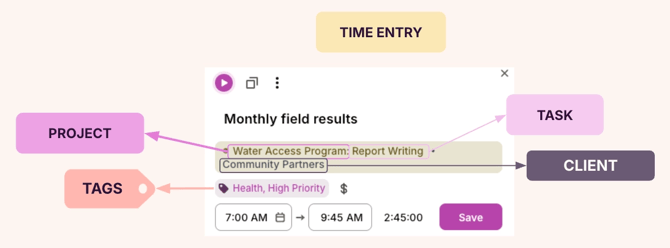
| Data Object | How it’s being used | Example |
|---|---|---|
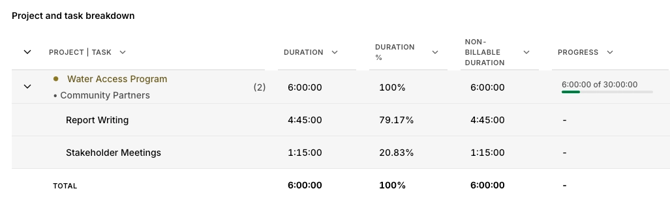
| Client | The partner organization the NGO is supporting | Community Partners |
| Project | The program or initiative the work contributes to | Water Access Program |
| Task | The specific activity completed for the program | Report Writing |
| Tags | The program focus area or urgency indicators | Health, High Priority |
| Billable / Non-billable | Shows this activity is operational and not linked to billable work | Non-billable |
| Description | Short summary of what was done | Monthly field results |
🧭 When to use this structure This structure works well for NGOs and non-profit teams that:
-
- Deliver work across community programs, grants, initiatives, and need a clear way to organize time by project.
- Support multiple organizations and need clear visibility into where time is allocated.
- Need to categorize work by program theme (health, education, environment) or urgency.
- Build reports and metrics for donors, internal leadership, community partners, and need reliable time data to support that.