
Who are organization owners?
Organization owners control the data associated with their organization and workspaces in it.
What is the purpose of organization owners?
In general, there are two types of data in Toggl Track:
- User data which belongs to each individual user account
- Organization data which belongs to the organization owner
User data refers to data such as username, email, location, connected workspaces, and other account-specific data.
Organization data refers to all data related to the subscription, time entries, projects, clients, tags and tasks created within an organization and its workspaces. Legally speaking, all the data in an organization belongs to that organization and is controlled by the organization owner.
A practical example here would be if you were to leave or be deactivated from an organization, all the data you created within that organization will no longer be available to you, it remains within the organization and is controlled by the organization owner.
How does a user become the organization owner?
When an organization is created, the user who created it becomes the organization owner by default. While a single user can be the owner in multiple organizations, each organization will have only one owner.
An organization always has an owner, the owner is always an administrator in the organization and can not be removed or deactivated until the ownership is transferred to another member of the organization with organization admin access rights.
How to transfer organization ownership to another user in the organization?
The request for a change of ownership can be done via our web app. As organization admins are the only ones who can make the request, this option is available under Organization > Settings.
- Visit the Organization Settings page, and scroll to the bottom.
- Select which one of the organization admins should be the new owner.
- Send the request.
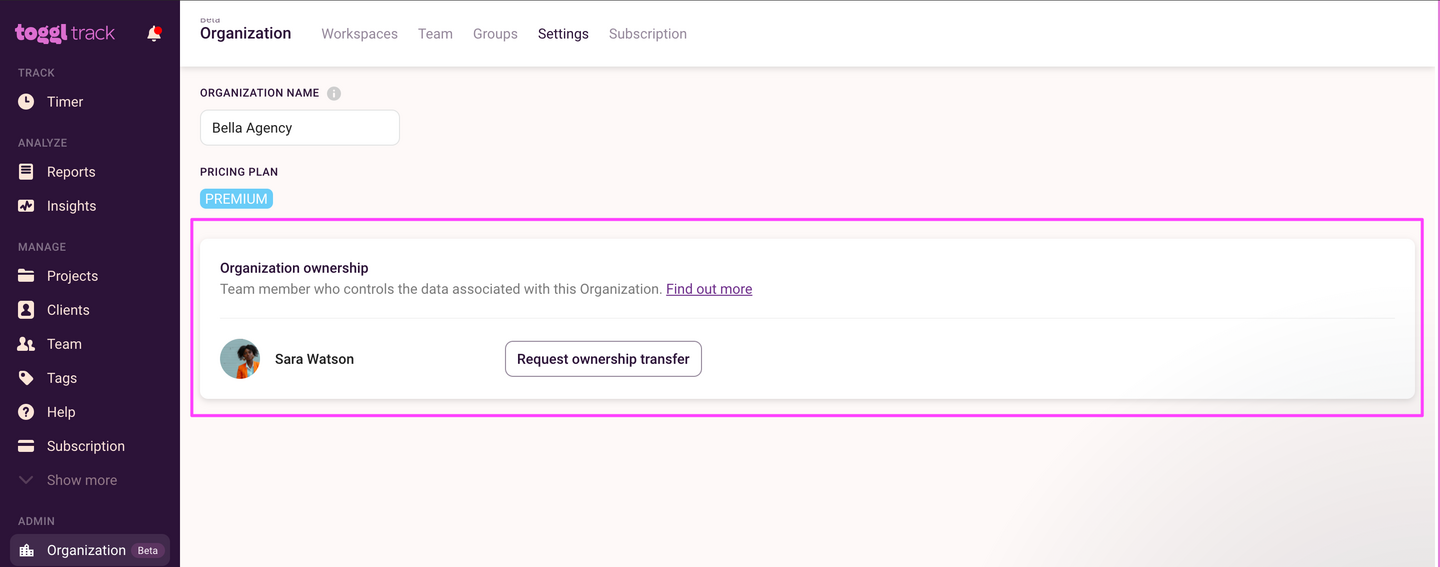
You can cancel the request at any time and you can also check the page to see if the request is still ongoing.
Both old owner and a potential new owner will receive an in-app notification where they can either accept or decline the request. Once both parties accept it, the ownership is transferred.
If you run into any issues, feel free to reach out to our Support team via the chat button in the bottom right corner.
How to transfer ownership when the current owner is no longer available
The in-app transfer requires both the current owner and the new owner to approve the request. If the previous owner has left the company and their email/account can no longer be accessed, the first step is to check whether their email address can be temporarily reactivated, is forwarded to another team member, or is otherwise accessible so someone on your team can log in and approve the transfer.
If there is no way to access the previous owner's account, our Support team can process the change manually via a longer process that requires the following documentation:
- A document or electronically-signed email/letter from an authorised company officer, sent using the organization's email domain. It must include this exact statement:
"I confirm I have corporate authority to request reassignment of the Toggl Organization Ownership for '[ORG NAME]' from [CURRENT OWNER EMAIL] to [NEW OWNER NAME, EMAIL]. I accept responsibility for and indemnify Toggl against any claims, losses, or liabilities arising from this change, and I authorise Toggl to execute the reassignment accordingly."
It must also state which workspace user (email address) should be made an Organization admin, so both changes can be processed together. - An official document showing the signer's role (e.g., business register extract, Companies House/SEC filing, board resolution, power of attorney, or an internal delegation letter signed by a higher officer).
- The latest invoice plus the last 4 digits of the payment card/PO, or a confirmation from your Finance/AP department that they manage payment for this Toggl subscription.
Once this documentation is received, our legal department reviews it. We then email the current owner and wait 5 days for a response, after which the change can be made manually.
How do I know who is the current organization owner?
The current organization owner can be identified on the same page where ownership change is requested from.
Updated on: 07/24/2026
Thank you!