
Multi-Layer Approval flow
This guide outlines the notification logic for multi-layer approval workflows, specifically addressing how alerts function during initial submissions and rejections.
This feature is available on the Premium and Enterprise plans
Submissions & Approvals
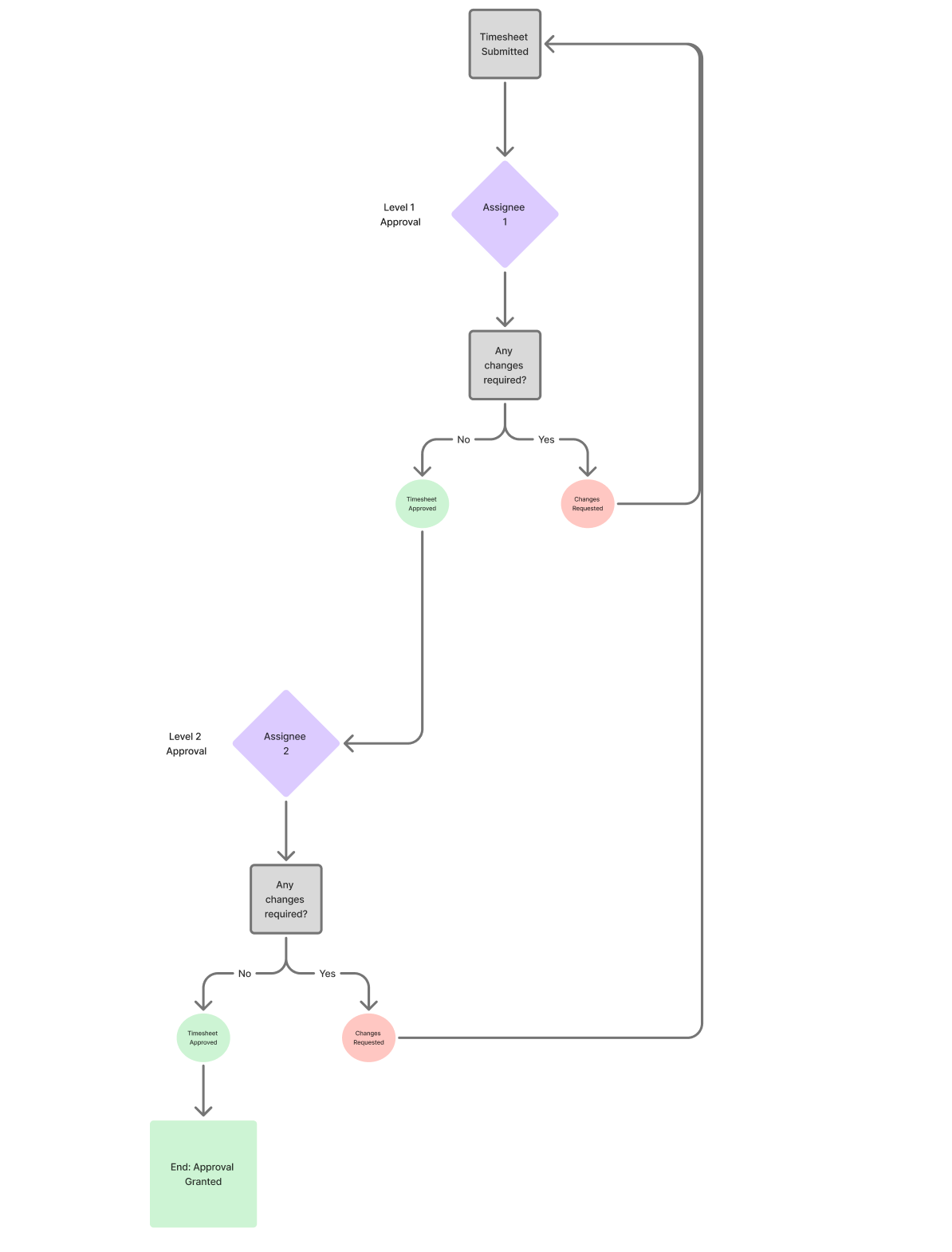
If you have set up a multi-layer approval flow, users who have actions to perform such as approval, requesting changes will be notified at point of initial submission. So if a timesheet has 2 layers, and the user has just begun the workflow and submitted it to the first approval layer, only approvers on that layer receive the initial submission notification. When someone from the first layer approves, then the users from the second layer get the notifications. Additionally, if a user is present in multiple layers, it will get the notification multiple times while the timesheet follows the approval workflow.
Rejections (Changes Requested)
At the moment of rejection, a notification is sent to the timesheet submitter about the rejection itself with the rejection comment/reason.
After the requested changes have been addressed, and the submitter resubmits the timesheet, the whole approval flow begins again and all subsequent approvers on the first layer will receive a new notification and the same thing happens on layer 2.
Updated on: 06/16/2026
Thank you!