
What are Required Fields?
Required Fields is a workspace-level setting that lets admins mark certain task fields as mandatory. When enabled, users must fill in all required fields before they can create or save a task or time log.
This feature mirrors the Required Fields functionality from Toggl Track, now available in Toggl 2.0.
Who can configure Required Fields?
Only workspace admins and organization admins can enable or disable required fields. Regular members cannot change these settings but must comply with them when creating or editing tasks and time logs.
How to enable Required Fields
- Go to Settings in your workspace
- Navigate to the Required Fields section
- Toggle on the fields you want to make mandatory
- Click Save
Currently supported required fields:
For tasks
- Tags - require users to select at least one tag when creating a task
- Project - require users to assign a project to each task
For time logs
- Project - require users to assign a project to each time log
- Task - require users to assign a task to each time log
- Time log description -require users to add description to each time log
More field types (priority, estimate, billable state and Custom Fields) are planned for future releases.
What happens when Required Fields are enabled
Creating tasks
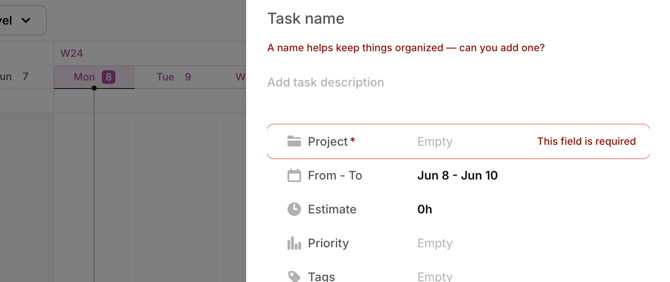
Users will see required fields marked with an asterisk (*). The task cannot be saved until all required fields are filled in. Empty required fields are highlighted with an error state.
Subtasks
Required fields validation also applies to subtasks. A subtask cannot be created without filling in the required fields.
Browser extension
The browser extension supports required fields. If required fields are set, users must fill them out in the extension.
Tasks and time logs created before enabling Required Fields
Tasks and time logs that were created before required fields were turned on remain editable without filling in the newly required fields. However, starting a time log on older tasks will fail until the required fields are added.
Important notes
- Premium feature: Required Fields is available on the Premium plan and above. If your workspace is on a free plan, you will not see this option in Settings.
- Mobile app: The mobile app does not yet fully support all required field types. If tags are set as required, users may need to use the web app or browser extension to create tasks until mobile support is added.
- API and bulk operations: The backend enforces required fields validation on all task creation endpoints, including bulk create/update. API consumers will receive a
422error with details on which tasks are missing required fields:
{
  "error": "required_fields_missing",
  "error_description": "Please fill in all required field(s) to proceed: task 1: tags; task 3: tags"
}
FAQ
-
Can I make different fields required for different projects?
Not currently. Required fields are configured at the workspace level and apply to all tasks across all projects. Project-level required fields may be considered in future iterations.
-
What happens if I turn off a required field after it was enabled?
The constraint is removed immediately. Users can create and edit tasks and time logs without that field going forward. Existing tasks and time logs are not affected.
-
Will this affect tasks and time logs created by integrations or the AI assistant?
Yes. The backend enforces required fields on all task and time log creation endpoints. Integrations and AI-generated tasks and time logs that don't include the required fields will receive a validation error and need to be updated to include them.
-
Can regular members see which fields are required?
Yes. Required fields are visually indicated in the task and time logs creation flow (asterisks, error borders). Members just cannot change which fields are required.